
這是一個利用vue.js 將json data 取回來 並依點擊的事件 讓不同component 顯示不同的內容的範例
data.json
  {
    "_id": "58379018146a09705a1dd0eb",
    "guid": "aa2361a6-c49c-46a0-837d-5bfff6924b89",
    "isActive": true,
    "age": 22,
    "car": "gogoro",
    "pet": "cat"
  },
  {
    "_id": "583790181eaefda6f6f74c93",
    "guid": "e694dafa-5f8d-4d95-8d9f-ef5d7f4df589",
    "isActive": false,
    "age": 24,
    "car": "toyota",
    "pet": "doggy"
  },
  {
    "_id": "58379018447bc827cdd99557",
    "guid": "7dbb0102-e8e8-4ec6-8c93-eb747d33eff3",
    "isActive": true,
    "age": 39,
    "car": "kymco",
    "pet": "pig"
  }
]
註冊組件
 Vue.component('car', {
            props: ['message', 'items'],
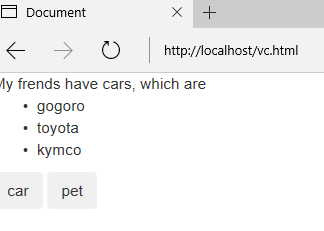
            template: '<div>{{message}} cars, which are <ul><li v-for="item in items">{{item.car}}</li></ul></div>',
        });

        Vue.component('pet', {
            props: ['message', 'items'],
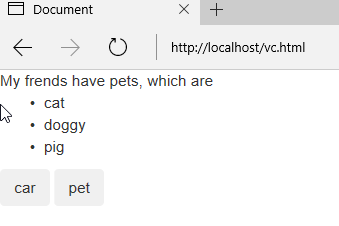
            template: '<div>{{message}} pets, which are <ul><li v-for="item in items">{{item.pet}}</li></ul></div>',
        });
props 裡的message 及items 是由父組件來的
父組件
var app = new Vue({
            el: '#app',
            data: {
                currentView: '',
                message: 'My frends have ',
                items: []
            },
            methods: {
                getData: function(currentView) {
                    this.currentView = currentView;
                    this.$http.get('data.json', {
                            params: {
                                ID: 12345
                            }
                        })
                        .then(function(response) {
                            this.items = response.data;

                            console.log(this.items);
                        })
                        .catch(function(error) {
                            console.log(error);
                        });

                }
            }
        });
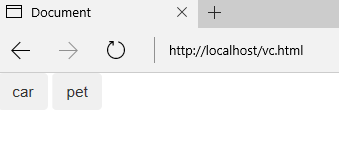
預設的view 是父組件,當使用者按下按鈕後,會因觸發不同的事件產生不同的結果,currentView的值會因此對應到
 <component v-bind:is="currentView" :message="message" :items="items">
            <!-- component changes when vm.currentView changes! -->
  </component>
:items="items" 是 v-bind:items="items" 的縮寫 讓字面更為簡潔
完整寫法
<!DOCTYPE html>
<html lang="en">

<head>
    <meta charset="UTF-8">
    <title>Document</title>
    <!-- Latest compiled and minified CSS -->
    <link rel="stylesheet" href="https://maxcdn.bootstrapcdn.com/bootstrap/3.3.7/css/bootstrap.min.css" integrity="sha384-BVYiiSIFeK1dGmJRAkycuHAHRg32OmUcww7on3RYdg4Va+PmSTsz/K68vbdEjh4u" crossorigin="anonymous">
    <!-- Optional theme -->
    <link rel="stylesheet" href="https://maxcdn.bootstrapcdn.com/bootstrap/3.3.7/css/bootstrap-theme.min.css" integrity="sha384-rHyoN1iRsVXV4nD0JutlnGaslCJuC7uwjduW9SVrLvRYooPp2bWYgmgJQIXwl/Sp" crossorigin="anonymous">
    <script src="https://ajax.googleapis.com/ajax/libs/jquery/1.12.4/jquery.min.js">
    <!-- Latest compiled and minified JavaScript -->
    < script src = "https://maxcdn.bootstrapcdn.com/bootstrap/3.3.7/js/bootstrap.min.js"
    integrity = "sha384-Tc5IQib027qvyjSMfHjOMaLkfuWVxZxUPnCJA7l2mCWNIpG9mGCD8wGNIcPD7Txa"
    crossorigin = "anonymous" >
    </script>
    <script src="//unpkg.com/vue/dist/vue.js"></script>
    <script src="//unpkg.com/vue-resource@1.0.3/dist/vue-resource.min.js"></script>
</head>

<body>
    <div id="app">
        <component v-bind:is="currentView" :message="message" :items="items">
            <!-- component changes when vm.currentView changes! -->
        </component>
        <button @click="getData('car')" class="btn">car</button>
        <button @click="getData('pet')" class="btn">pet</button>
    </div>
    <footer>

        <script type="text/javascript">
        Vue.component('car', {
            props: ['message', 'items'],
            template: '<div>{{message}} cars, which are <ul><li v-for="item in items">{{item.car}}</li></ul></div>',
        });

        Vue.component('pet', {
            props: ['message', 'items'],
            template: '<div>{{message}} pets, which are <ul><li v-for="item in items">{{item.pet}}</li></ul></div>',
        });

        var app = new Vue({
            el: '#app',
            data: {
                currentView: '',
                message: 'My frends have ',
                items: []
            },
            methods: {
                getData: function(currentView) {
                    this.currentView = currentView;
                    this.$http.get('data.json', {
                            params: {
                                ID: 12345
                            }
                        })
                        .then(function(response) {
                            this.items = response.data;

                            console.log(this.items);
                        })
                        .catch(function(error) {
                            console.log(error);
                        });

                }
            }
        });
        </script>
    </footer>
</body>

</html>

END
