[精讚] [會員登入]
6084

在windows server建立radius服務使用active directory帳號驗證

setup windows server to add radius service using active directory accounts for authentication

分享此文連結 //n.sfs.tw/12934

分享連結 在windows server建立radius服務使用active directory帳號驗證@外行中的外行
(文章歡迎轉載,務必尊重版權註明連結來源)
2019-10-25 13:53:02 最後編修
2018-11-29 23:40:12 By jung
 

本篇記錄設定windows server 2012r2, 2016 AD網域控制站、憑證服務、網路原則伺服器NPS、RADIUS過程

1.流程:

1-1要先建立AD網域控制站DC,將default domain policy有關使用者密碼原則等設定完成

1-2安裝AD憑證服務並設定完成NPAS憑證授權單位,在安裝過程中就會一步步建立一個本機憑證

https://forsenergy.com/zh-tw/radius/html/7a2cb3e1-d6de-44d8-8f8e-7309acb68383.htm

注意! 安裝AD CS (Active Directory Certificate Services)

必須產生企業版憑證Enterprise CA 之後要設定LDAPS連線才會正常

可參考

https://pdhewaju.com.np/2016/04/08/installation-and-configuration-of-active-directory-certificate-services/

https://msptechs.com/how-to-install-enterprise-ca-on-windows-server-2016/

1-3安裝網路原則伺服器,設定RADIUS服務端

2.注意事項

2-1 新增Radius用戶端設定

https://docs.microsoft.com/zh-tw/windows-server/networking/technologies/nps/nps-plan-server

2-2 新增連線要求原則設定
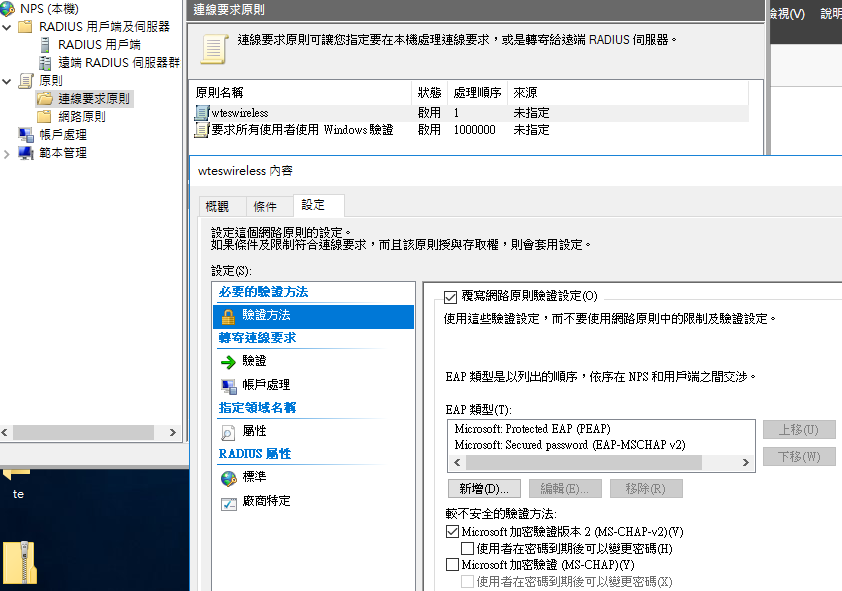
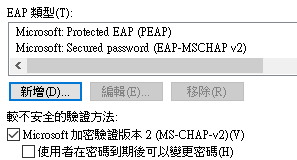
要有這二種驗證方法,還要勾選使用MS-CHAP-v2
 

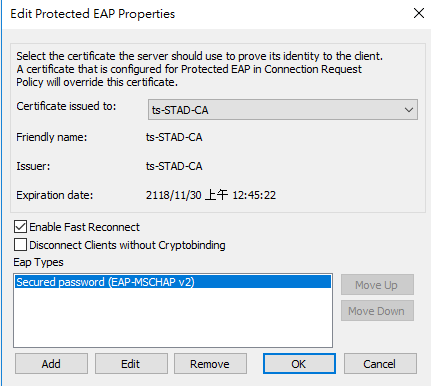
編輯EAP類型->PEAP,選擇內建的憑證
 

接下來要設定LDAPS才能安裝LTB SSP

https://ltb-project.org/documentation/self-service-password


END

你可能感興趣的文章

logrotate執行權限問題 logrotate will failed to execute if selinux policy not setup correctly

nginx+ssl+certbot安裝設定雜記 using certbot on nginx to setup https connection

bitbucket repository control application setup 安裝完bitbucket服務後,須設定bitbucket.properties

wireguard vpn setup and implementation 在UBUNTU20.04LTS server架設wireguard vpn讓ios及android裝置使用

setup jira using ssl on apache reverse proxy 設定jira使用https連線

在windows server建立radius服務使用active directory帳號驗證 setup windows server to add radius service using active directory accounts for authentication

隨機好文

回應 修正pom.xml,

縣市IDP更換SSL憑證及修改servername+wildfly等設定 縣市IDP更換SSL

設定win10開機自動執行openvpn連接vpn server how to make win10 connecting to a vpn server automactically after booting up

更新java版本後一定要做的事情 how to deal with PKIX path building failed issue after upgrade java sdk version in IDE