[Jinzan] [Login]
335

netbeans IDE scaling on Win10

how to change scaling not to see tiny little letters in the IDE

Full Link //n.sfs.tw/11621

Copy Link netbeans IDE scaling on Win10@der amateur
(Welcome to reprint and indicate the source when reproducing.)
2020-03-07 13:58:35 Last edition
2017-08-14 14:44:05 By
 

if you ever had this problem like i did,

here's the quick solution.

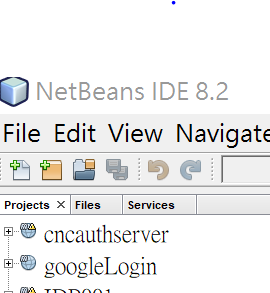
problem: when windows 10 starts, the netbeans program will determinte the DPI option to change its default font size on working window tabs,

so if you had a high resolution monitor, the netbeans started like this figure below.

you can tell how big difference between up widow tab and lower window tab's font size
 

the solution is, find "netbeans.conf" file, usually located at: C:\Program Files\NetBeans 8.2\etc

and modified this line: netbeans_default_options=..........

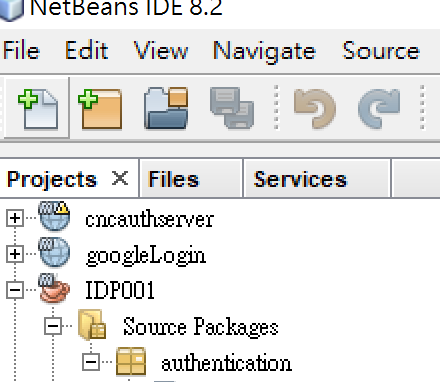
change"-J-Dsun.java2d.dpiaware=true" to "-J-Dsun.java2d.dpiaware=false"

saved the conf file, then restart netbeans

now you can see it works.
 

END

You may be interested

repairing esxi guest system after power failure if centos7 guest system reboot failed after power failure

netbeans IDE scaling on Win10 how to change scaling not to see tiny little letters in the IDE

random articles

setup jira run under build-in tomcat web server with https setup jira run under native tomcat web server with https